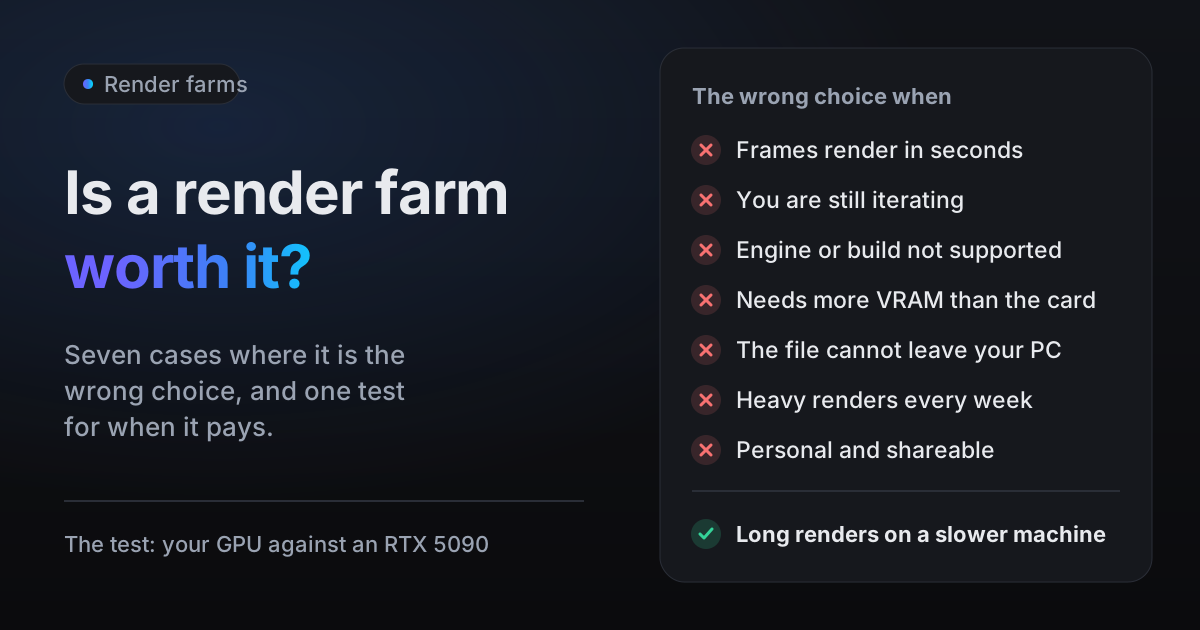
Is a render farm worth it? For a lot of Blender work, honestly, no. We run one, blender.farm, and below are the seven cases where we would tell you not to use it, and often not to use any farm, followed by the shorter list where sending a scene out does pay. Underneath all of them sits one question: how fast is the computer you already own?
Is a render farm worth it? Start with your own GPU
A render farm sells you time on someone else's GPU, so what it is worth depends on how much faster that GPU is than yours, and the gap differs a lot from one artist to the next. Blender's own benchmark database, Blender Open Data, publishes a median score per device. Here are the Blender 4.5.0 medians for common cards against the RTX 5090 that every render on blender.farm gets:
| Your GPU | Open Data score, Blender 4.5.0 | An RTX 5090 (14,966) is |
|---|---|---|
| NVIDIA RTX 4090 | 11,061 (OptiX) | about 1.35x faster |
| NVIDIA RTX 4070 | 5,219 (OptiX) | about 2.9x faster |
| Apple M4 Pro, 20-core GPU | 2,568 (Metal) | about 5.8x faster |
| NVIDIA RTX 3060 | 2,155 (OptiX) | about 6.9x faster |
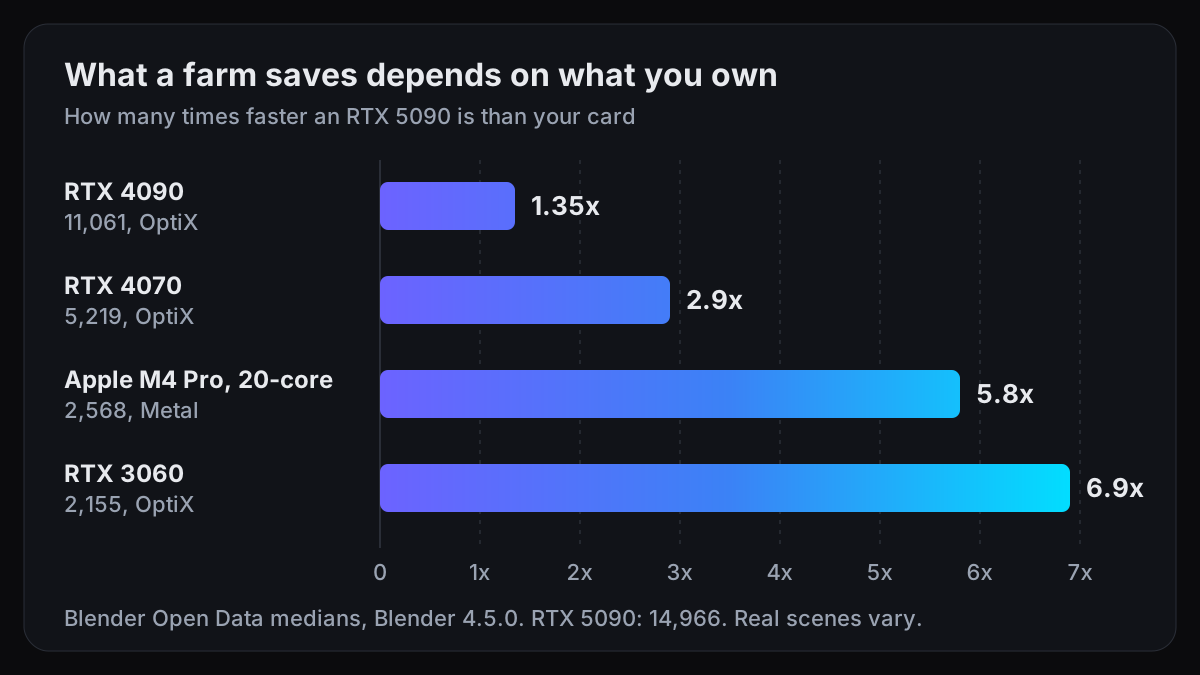
Read the ratio as a rough multiplier, not a promise. The benchmark scenes are not your scene, and a scene that runs short of memory on the smaller card, or spends much of each frame on the CPU preparing geometry, will not scale the same way. If you own a 4090, the faster card cuts about a quarter off each frame (1 minus 1/1.35 is 26%). If you own a 3060 and your scene behaves like the benchmark, it cuts about six sevenths (1 minus 1/6.9 is 86%). Those are two different decisions.
To find your own number, search for your card on Blender Open Data, or run the Blender Benchmark launcher from the same site.
1. Your frames already render in seconds
Quick EEVEE sequences, Workbench previews, product stills with a few lights: if a frame takes seconds on your machine, a farm has very little to save. The rendering itself is cheap. On blender.farm a 4 minute render costs 0.25 credits, about 25 cents on the 10-credit pack. But the render is not the whole trip.
Before the first frame, the scene has to upload, a machine has to start, and it has to download your files. On blender.farm none of that is billed, but none of it is instant either, and the upload runs at whatever your connection's upstream allows. A local render starts the moment you press F12. If the whole job finishes at your desk in a few minutes, render it at your desk.
2. You are still changing the look
A render farm is for the final, not the drafts. While you are still moving lights and adjusting materials, every change means another upload and another wait for results. Iterate locally at draft quality:
- 1Render fewer pixelsIn Output Properties > Format, set the resolution % slider to 50%. That renders a quarter of the pixels with the same framing, which is what the manual says the slider is for: small test renders with the same proportions as the final image.
- 2Render less of the frameIn camera view, press Ctrl+B and drag a box to set a Render Region, so only the part you are working on renders. Ctrl+Alt+B clears it.
- 3Sample lessIn Render Properties > Sampling > Render, lower Max Samples and raise the Noise Threshold for drafts. The manual gives 0.1 to 0.001 as the typical range, lower meaning better quality and longer renders. For EEVEE, lower the render Samples in the same panel.
- 4Check timing with fewer framesSet Step in Output Properties > Frame Range to 5 or 10 to see the whole animation's motion from a fraction of its frames.
Once the look stops changing, send the final at full quality. That is the render worth paying a farm for.
3. The farm does not run your engine or Blender build
Every farm supports a set of engines and Blender versions, and outside that set the answer is simply no. blender.farm renders Cycles and EEVEE only, on Blender 4.4, 4.5 LTS, 5.0, 5.1 and 5.2, and each render uses the version your .blend was saved in. A file saved in a version older than 4.4 is refused before it uploads, rather than rendered on a version it was not made for. A scene set to a third-party engine is flagged before you spend anything.
If your scene needs something else, other farms cover it, by their own pages:
- A third-party engine such as Octane or Redshift: Super Renders states that "V-Ray, Corona, Redshift, Arnold, and Octane licenses are all included" when you render on its farm. Check that it supports the engine's Blender plugin before you upload.
- Cinema 4D or Houdini as well as Blender: Drop & Render states that it "supports Cinema 4D, Blender, and Houdini".
- A daily build or an unusual Blender version: iRender rents remote machines you control yourself, and lists "arbitrary Blender versions or daily builds" among what you can run on them.
Re-saving an older file in Blender 4.4 or newer is sometimes an option, but render a frame locally afterwards and compare it with the original: a version change can change how a scene looks.
4. The scene needs more VRAM than the farm's card
A GPU render has to fit the scene into the card's memory. Every render on blender.farm gets one RTX 5090 with 32 GB of VRAM, more than most consumer cards carry, but not unlimited. Our own troubleshooting guide says it plainly: a heavy volume scene can still exceed 32 GB. On Cycles, going over means a heavy slowdown, and on EEVEE it usually means the render fails outright.
If your scene really is in that range, you need a bigger card, not a faster one. GarageFarm lists "Up to 96 GB VRAM (single/multi-GPU)" on its Medium and High priority tiers, and the largest of its GPU nodes is "1x Nvidia RTX 6000 Pro Blackwell 96GB vRAM". Before you go looking, check whether the scene really needs it: texture sizes, subdivision levels and volume resolution are the usual causes, and how much VRAM Blender needs covers how to check. The blender.farm add-on's estimate also checks a scene against the card's memory before anything uploads.
5. The file cannot leave your machine, or the contract names the vendor
Some client contracts forbid uploading the client's assets to any third party at all. If yours does, no render farm is the answer, ours included. Render in-house, on your own machines (the two-PC setup below works for that).
Other contracts allow outside rendering, but only with a vendor that holds a named security accreditation. Fox Renderfarm, for example, states that it "is a TPN-accredited vendor with ISO 27001 certification" and that "NDA agreements are available".
blender.farm does not carry those certifications; as our FAQ says, we are a small operation. On ours, uploads go straight to object storage under your account, the render machine is destroyed with everything on it when the job ends, and uploads, frames and logs are deleted after 30 days. That describes how files are handled, not an audit, so if the contract names TPN or ISO 27001, that is a real reason to pick Fox, as our Fox Renderfarm comparison also says.
6. You render heavy scenes every week
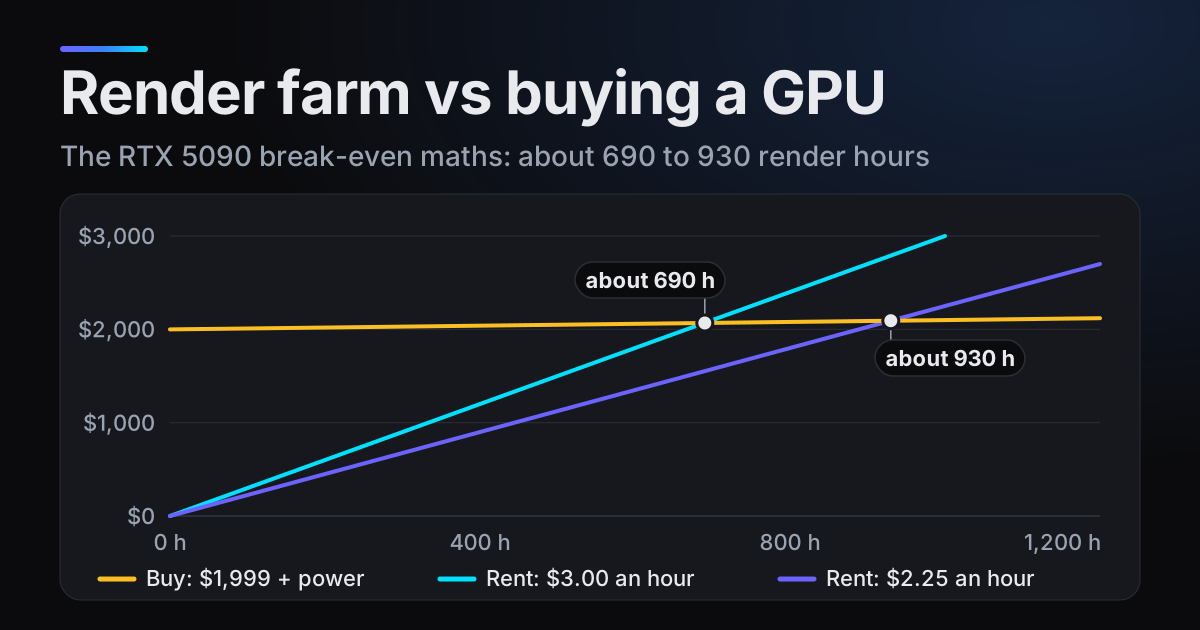
Renting suits bursts of rendering. If your GPU is busy with heavy renders week after week, owning eventually wins, because a card you own costs nothing more per hour once it is paid for, apart from electricity.
The break-even is the card's price divided by what an hour of rendering costs you elsewhere. As an example calculation only, take a card that costs you $2,000. At blender.farm's $3.00 per RTX 5090 render hour, that is 2,000 / 3.00, about 667 render hours. At $2.25 on our largest pack, it is 2,000 / 2.25, about 889. Below that many hours, renting is cheaper; above it, owning is, before electricity and before counting the hours your own machine is tied up. Compare like with like, too: an hour on a slower card does less work than an hour on an RTX 5090. The full version is in render farm vs buying a GPU.
Two PCs of your own? Blender has a primitive render farm built in
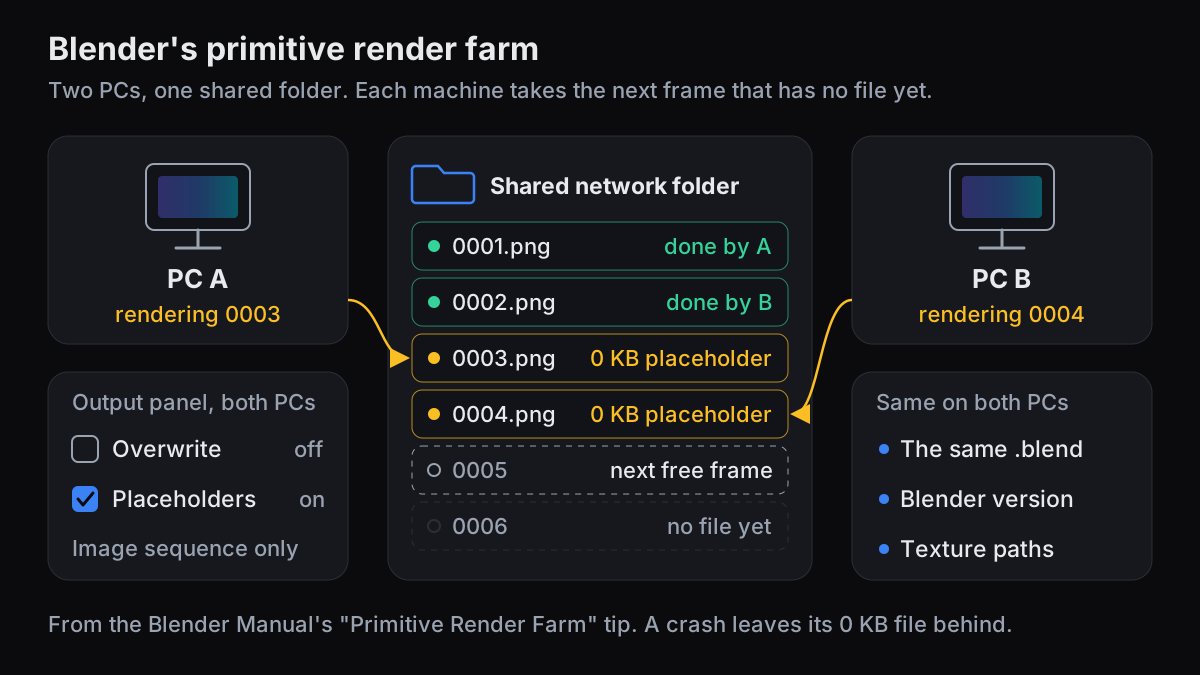
If you already own two or more computers, you can share an animation between them with nothing but Blender and a network folder. The Blender manual calls it a Primitive Render Farm: set up a shared directory, disable Overwrite, enable Placeholders, and start as many machines as you like rendering into it. Each machine skips frames that already have a file and claims the next one that does not.
- 1Share one folderCreate a folder on the network that every machine can write to, and set it as the output path in Output Properties > Output.
- 2Make the files reachableOpen the same .blend on every machine. Pack textures with File > External Data > Pack Resources, or use Make Paths Relative and keep them beside the .blend in the shared folder, so every machine finds them in the same place.
- 3Pick an image formatRender an image sequence, such as PNG or OpenEXR. Overwrite and Placeholders are image sequence options, so this does not work with a single video file.
- 4Set the two checkboxesIn Output Properties > Output, untick Overwrite and tick Placeholders, then save the file.
- 5Start every machineChoose Render > Render Animation (Ctrl+F12) on each one, or start them from a command line as below.
blender -b /path/to/shared/shot.blend -a
7. A personal project you are happy to share
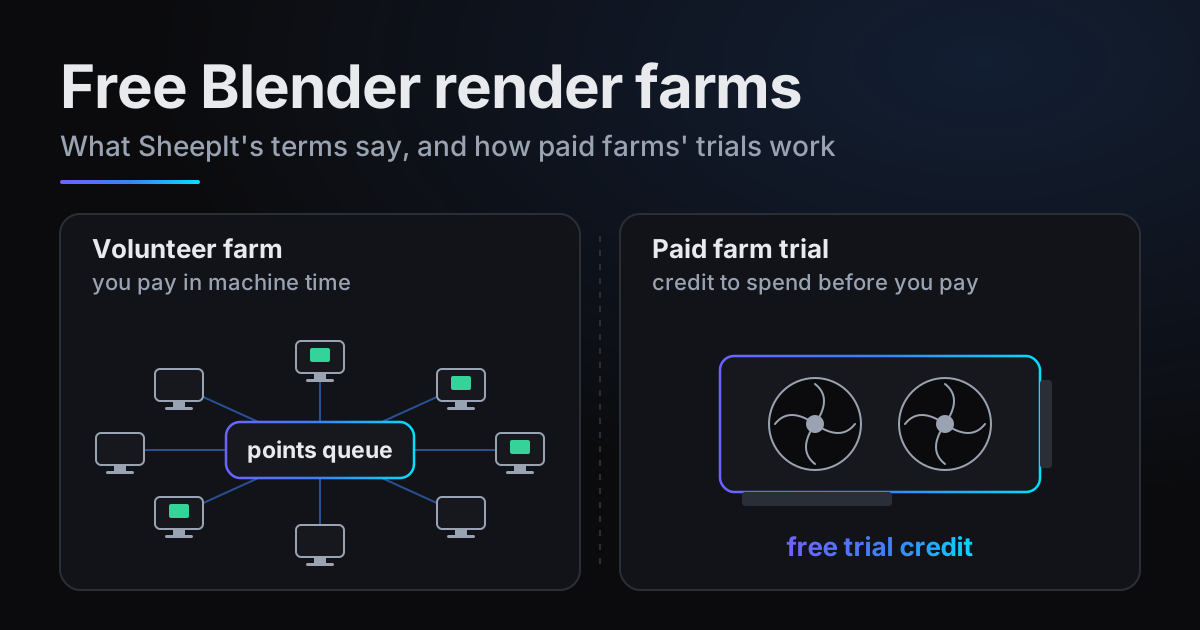
For personal work with no budget behind it, a volunteer farm can be the right call. SheepIt describes itself as "a free distributed renderfarm for Blender". Its FAQ explains that the service "doesn't own machines that render, but instead relies on people to share their computers", so your frames render on other users' machines. That is why it suits a project you are happy to share rather than a client's.
It is free, but not without conditions. Projects are queued by points: "The more points you have the higher priority your project will have", and you earn points by letting your own computer render other people's frames. Each project is limited to 2,048 MB, which the FAQ itself says is usually not enough for fluid bake files. If your short film fits those terms, it is a fair deal. Our free Blender render farm post goes through the options in more detail.
When a render farm is worth it
Put the seven cases together and what is left is narrow, but clear. For a final render, five of them become five questions:
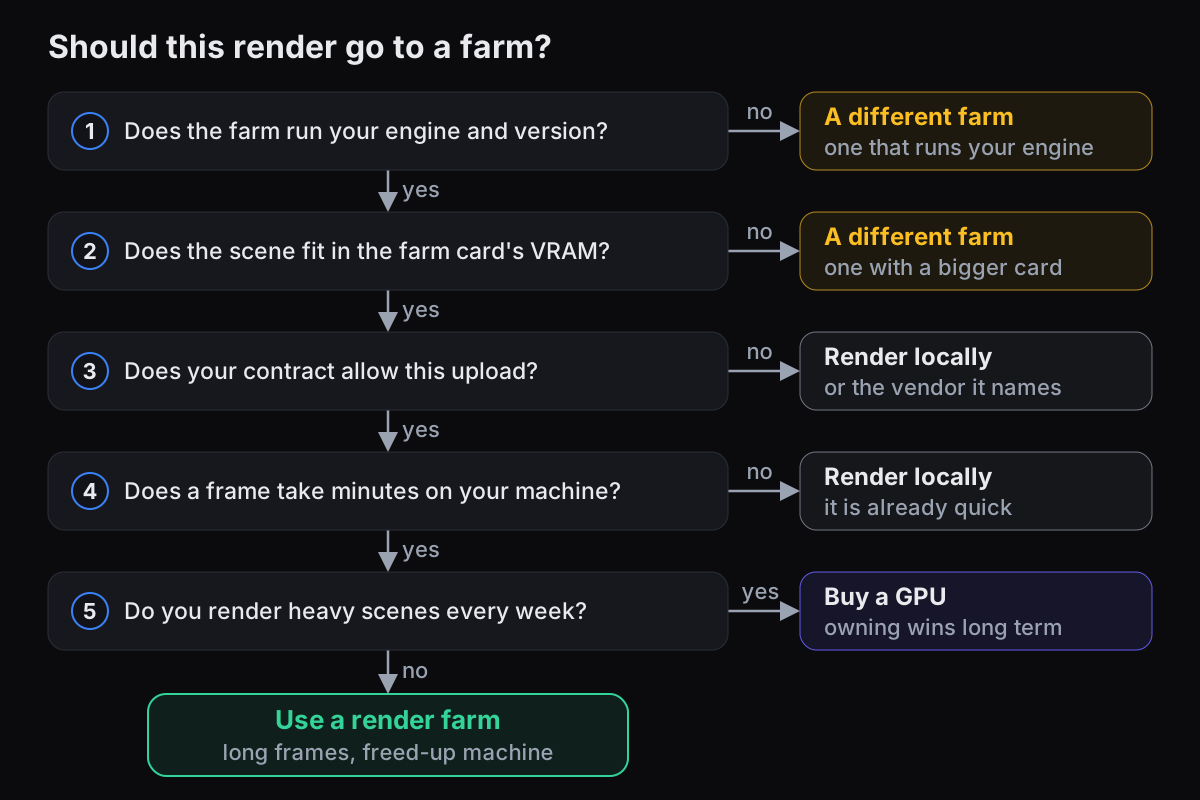
- Long animations where each frame takes minutes, in Cycles or EEVEE, on a GPU that scores several times below an RTX 5090: a 3060, a 4070, an Apple M4 Pro.
- Heavy stills at print resolution or high sample counts that would otherwise tie up your machine for an afternoon.
- A laptop or Mac you need for other work while it renders. Frames come back while the job runs, and your own machine stays free.
- A one-off project that needs more VRAM than your card has but fits in 32 GB, where buying a bigger card for a single job makes no sense.
That is the job blender.farm is built for. Every render gets one dedicated RTX 5090 with 32 GB, at about $3.00 per render hour on the 10-credit pack and $2.25 on the largest, billed in 5-minute blocks and only while Blender is rendering. Uploading, waiting for a machine and downloading results are free. The free add-on finds the textures, linked libraries, caches and add-ons your scene uses, and missing files are shown before you launch. New accounts get 10 free credits, which is 3h 20m of render time. Prices are on /pricing.
And our limits, in one line: Cycles and EEVEE only, Blender 4.4 to 5.2, 32 GB of VRAM, 5000 frames, 5000 files and 100 GB per job, no TPN or ISO certification, and our add-on does not upload UDIM tiles automatically. The rest is on Limits and retention.
Questions
- Do I need a render farm for EEVEE?
- Usually not. EEVEE renders on a single GPU with no multi-GPU support, so a farm mainly helps when your frames take minutes each on a card several times slower than the farm's, such as a 3060 against an RTX 5090, or when you need your own machine free.
- Is a render farm worth it for a single image?
- Only if the still takes a long time on your machine and you need the machine back. On blender.farm a render under 5 minutes costs 0.25 credits, but uploading the scene and starting a machine take time a local render does not, so a still that renders in seconds belongs on your own PC.
- Can I use two of my own computers as a render farm?
- Yes. The Blender manual describes a Primitive Render Farm: render an image sequence into a shared network folder with Overwrite off and Placeholders on, and start the animation on every machine. Each one claims the next frame that has no file yet.
- When is buying a GPU better than a render farm?
- When you render heavy scenes steadily, week after week, and the card's price divided by the hourly rate you would otherwise pay is fewer hours than you will render while you own it. Below that, renting costs less.
Sources
- Blender Open Data, Blender 4.5.0 medians, NVIDIA cards (OptiX), read 29 October 2026
- Blender Open Data, Blender 4.5.0 median, Apple M4 Pro 20-core GPU (Metal), read 29 October 2026
- Blender Manual, Output panel (Overwrite, Placeholders, Primitive Render Farm), read 29 October 2026
- Blender Manual, Format panel (Percentage, Render Region), read 29 October 2026
- Blender Manual, Cycles Sampling (Max Samples, Noise Threshold), read 29 October 2026
- Blender Manual, EEVEE Limitations (CPU rendering, multiple GPUs), read 29 October 2026
- GarageFarm, pricing (VRAM per tier, GPU configurations), read 29 October 2026
- Fox Renderfarm, Blender render farm (TPN, ISO 27001, NDA), read 29 October 2026
- Super Renders Farm, pricing (render engine licences), read 29 October 2026
- Drop & Render, home page FAQ (supported applications), read 29 October 2026
- iRender, Blender render farm service (Blender versions and daily builds), read 29 October 2026
- SheepIt Render Farm, FAQ (points, project size limit), read 29 October 2026
- SheepIt Render Farm, home page, read 29 October 2026