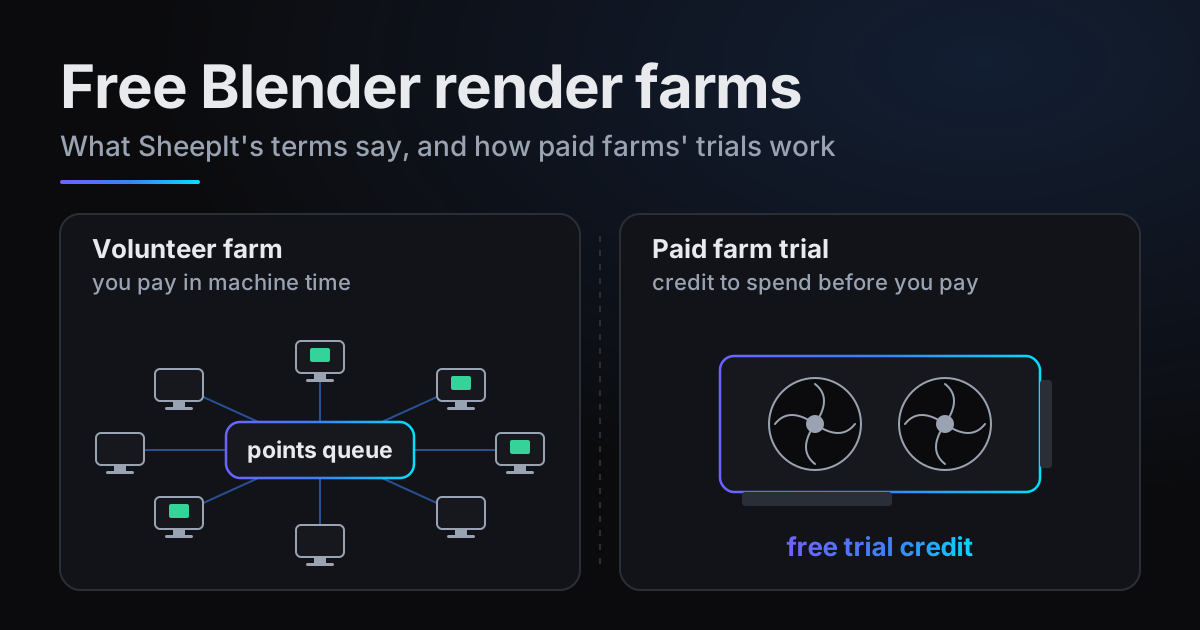
A free Blender render farm can mean two different things. SheepIt is free in money and paid for in machine time: it runs on computers that its users share, and rendering for others is what moves your own project up the queue. A paid farm's free trial is free up to a credit limit, under conditions each farm sets for itself.
Rather than paraphrase SheepIt, this post quotes it: everything below in quotation marks is the wording of its own pages, and we say plainly where the Terms of Use are silent. The second half does the same for each paid farm's free trial.
Two kinds of free Blender render farm
SheepIt's home page opens with "SheepIt is a free distributed renderfarm for Blender." It promises no subscription and no credit card, says it has been free since 2007, and lists "Cycles, Eevee, and Workbench included." The FAQ asks "Is it really free?" and answers "Yes, it is!" When we checked, the home page showed more than 400 machines rendering, over 70 active projects and more than 569 million frames rendered in total.
On a paid farm's trial, the farm runs the machines and its conditions decide what the credit is good for: whether a card is needed, whether output is watermarked, how many machines or jobs it may use. The table further down quotes them.
How SheepIt works, in its own words
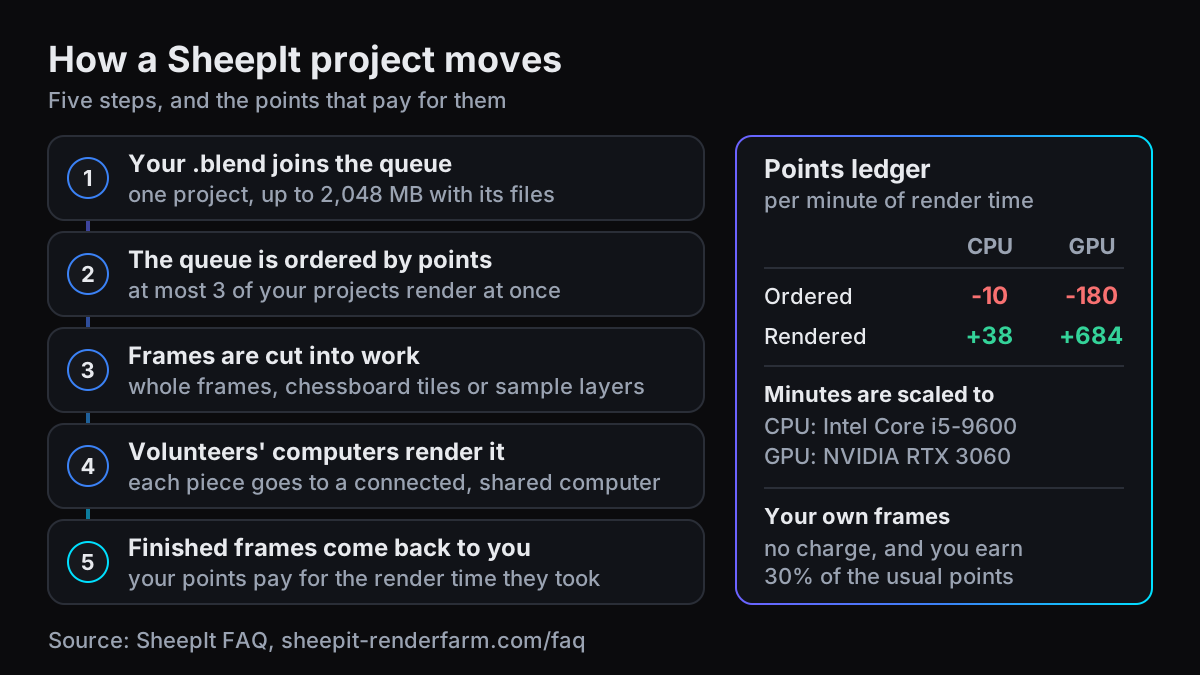
When the owner of a project adds their project to the queue, the service splits the animation into single frames to render. The service then sends each frame to a connected computer and aims to optimize its choice based on the available memory, as well as the CPU/GPU power.
SheepIt FAQ, "How does SheepIt work?"
The difference from other farms, in the FAQ's words: "the service doesn't own machines that render, but instead relies on people to share their computers." Frames can also be cut smaller, by a method "automatically detected during project upload": a chessboard split into tiles of "2x2, 4x4, 5x5 or 6x6", which does not support compositing, or a layers split, where "each frame is rendered with samples lower to 1/n and a different seed. Then recomposed".
To earn your place you run SheepIt's client, which downloads Blender for you. The Get started page: "Your own project will be rendered first, then your computer will help other users." The FAQ's minimum for the client is 8 GB of RAM with 2 GB free, 2 CPU cores and 40 GB of free disk.
The points system and the queue
Points decide when your project renders: "Points are used to order the list of projects. The more points you have the higher priority your project will have." You earn them by rendering other people's frames and spend them when someone renders yours, per minute of render time:
| Points per minute | CPU | GPU |
|---|---|---|
| Someone renders your frame (you spend) | 10 | 180 |
| You render someone's frame (you earn) | 38 | 684 |
| Reference machine the minutes are scaled to | Intel Core i5-9600 @ 3.70GHz x6 | Nvidia RTX 3060 |
Those minutes are scaled to the reference machine, not timed on yours, so a frame earns the same points whichever computer renders it. Rendering one of your own frames costs nothing and earns 30% of the points.
The FAQ's own example: 100 frames at 15 minutes each on the reference machine cost the owner 15,000 points (100 x 15 x 10, the CPU rate). Our example calculation of the way back: earning 15,000 points at 38 a minute takes 15,000 / 38, about 395 minutes (6.6 hours) of rendering for others at reference speed. Earning and spending run at 3.8 to 1 on both CPU (38 to 10) and GPU (684 to 180), so each hour you order is repaid by about 16 minutes (60 / 3.8) on the same kind of device.
- Three at a time. "You can add as many as you want BUT you can only have 3 rendering at the same time." When the farm is flooded, the limit is "temporarily lowered to 1".
- A deep negative balance pauses you. "When a project owner's point balance goes too far into the negative, we soft-pause the project to force the owner to participate."
- Points cannot be given away. "No, points are not transferable."
What SheepIt's Terms of Use actually say
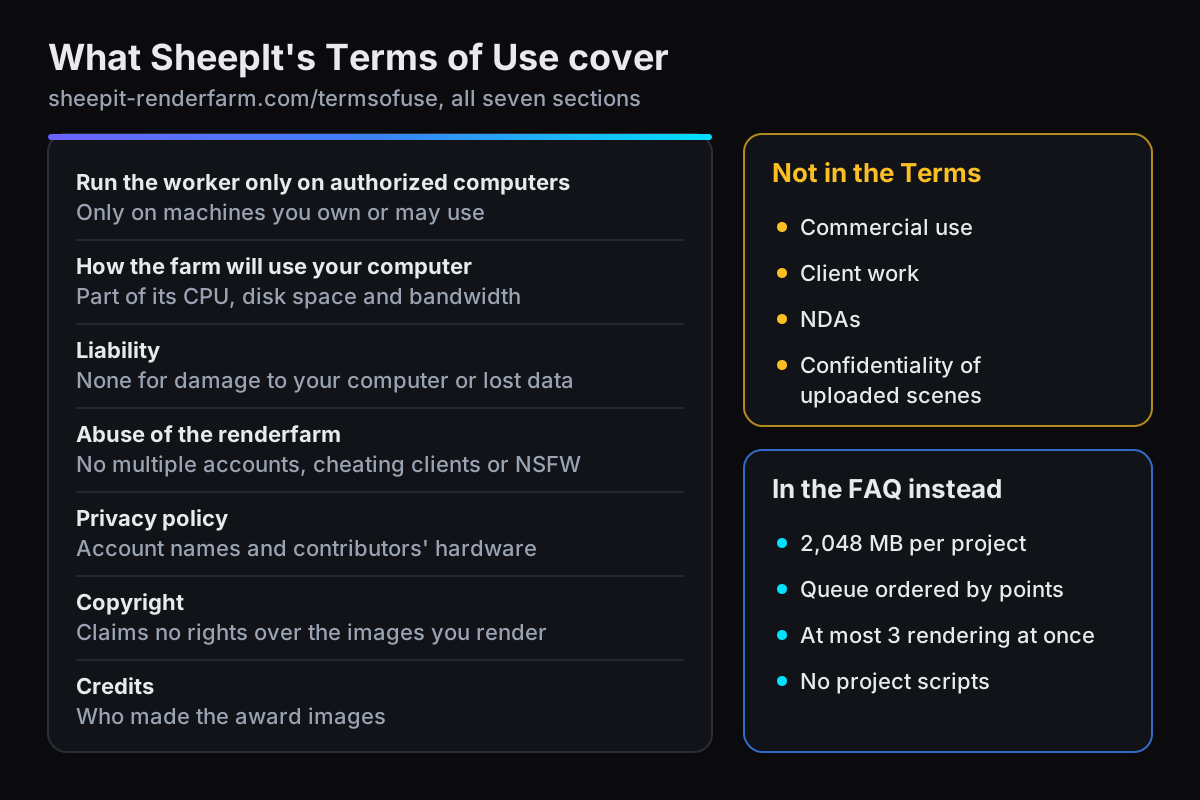
The Terms of Use page is short, seven sections: Run the worker only on authorized computers, How the farm will use your computer, Liability, Abuse of the renderfarm, Privacy policy, Copyright and Credits. The footer's Privacy policy link points to the same page. The copyright section, in full:
SheepIt Render Farm does not lay claim on generated images, it only acts as a tool to provide computing power to owners of the project. The project owners will have all rights reserved to them; as long as the claimant is the true rights' holder of all assets used, and complies with applicable free of use laws, as well as potential rights' holder permissions.
SheepIt Terms of use, Copyright
So SheepIt claims nothing over what you render, provided you hold the rights to every asset in the scene. The FAQ answer "Who owns the copyright of the images generated?" says nearly the same.
The abuse section's examples are "operating multiple accounts to circumvent SheepIt limitations, operating a custom client designed to cheat the scoring system or inject malicious code into the farm, uploading pornographic or other NSFW projects to be rendered." Its last line: "SheepIt is a community of shared resources, not a charity. Play safe, play fair."
The Privacy policy covers accounts and contributors' machines: "Your account is identified by a name that you choose", and information about a contributing computer "(such as its processor type, amount of memory, etc.) will be recorded by us and used to decide what type of work to assign to your computer." Liability: "This website assumes no liability for damage to your computer, loss of data, or any other event or condition that may occur as a result of participating in a render."
What the Terms do not say
The Terms say nothing about commercial use, client work, NDAs or the confidentiality of uploaded scenes. We found none of those topics on the FAQ, home or Get started pages either.
So "not for client work" is not a SheepIt rule, and neither is the opposite. The Terms are silent, so they support no claim either way, and this post makes none.
What the pages do describe is how the work is done: per the FAQ, each frame goes to "a connected computer", and those computers belong to people who share them. The privacy section covers account names and contributors' hardware. It makes no confidentiality promise about the scene you upload.
The limits that do apply
The practical limits live in the FAQ, not the Terms:
- 2,048 MB per project. "You are limited to 2,048 MB per project, which is usually not enough to include all fluid bake files." The FAQ's workaround is to split the bake into parts under 2,048 MB and upload each as its own project.
- No project scripts. SheepIt embeds its own Python script, "but we do not allow the owner of a project to use their own script."
- Stable releases only. Beta or daily builds: "No, we do not because they are not stable enough." And "On project creation, the version will be auto-detected, but you can override it."
- No NSFW. "Since we don't have a minimum age requirement, we assume everyone is under 18."
- OpenEXR output has its own rules. "Only animations are supported, no single image projects. Maximum image resolution 4096x2160 px." Full frames only, with compression.
- Custom colour configs work if you ship them, as a folder named
OCIOnext to the .blend containing aconfig.ocio. It counts toward the size limit.
Checking a scene against 2,048 MB
- 1Make paths relativeFile > External Data > Make Paths Relative, so textures and caches resolve from the project folder. SheepIt's fluid walkthrough includes this step too.
- 2Find missing filesFile > External Data > Report Missing Files. Per the manual, no warning means no missing external files.
- 3Pack what can be packedFile > External Data > Pack Resources marks eligible files as packed, and packing happens on the next save. Sequence Editor videos and Movie Clips cannot be packed, and a fluid bake's cache folder still travels next to the .blend.
- 4Measure the whole folderAdd up the .blend and every cache folder it uses. Over 2,048 MB, the FAQ's route is to split the animation into several projects, each under the limit.
When SheepIt is the right choice
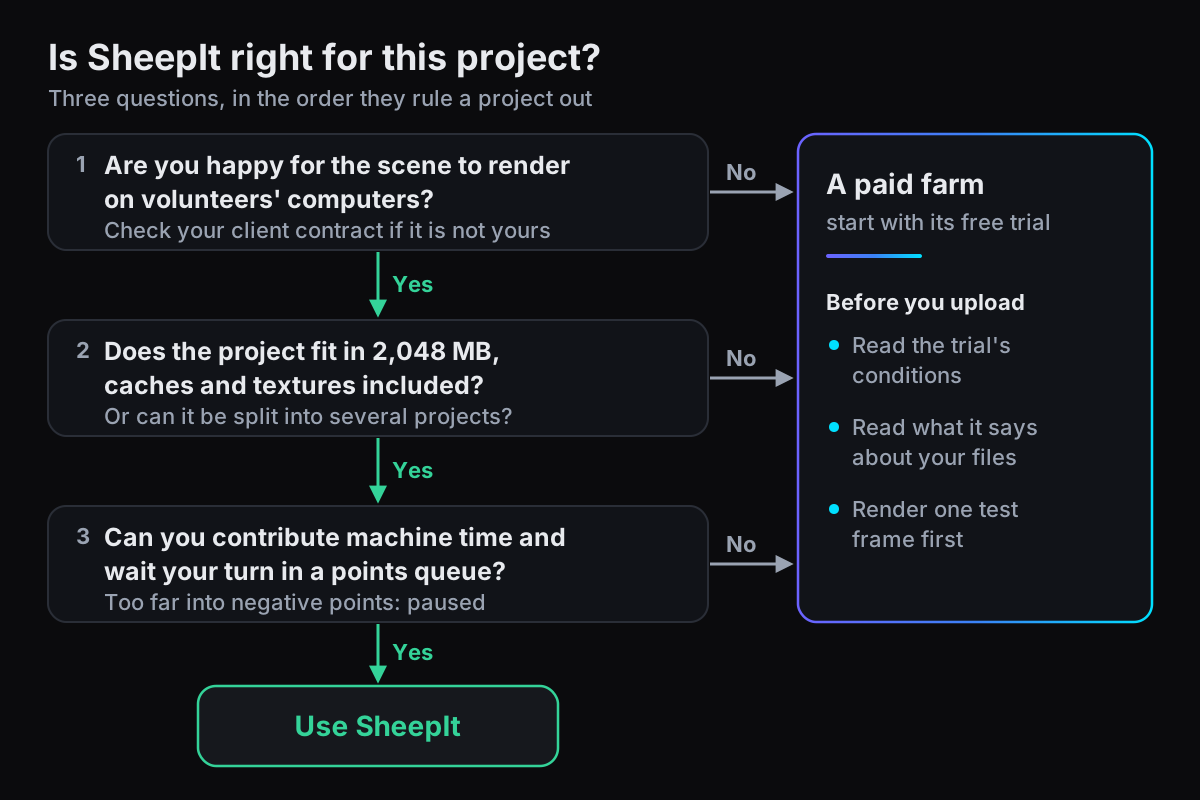
SheepIt is a good, long-running community service, and for the right project it is the obvious pick: personal work you are happy to have rendered on other people's computers, that fits in 2,048 MB with its caches, when you can contribute machine time and wait your turn in a queue ordered by points. Student films, personal animations and tests often tick all three boxes, and your machine helps other artists while it earns your place.
Free trials on paid render farms, quoted
Each trial below is quoted from the farm's own page, alphabetically, with the conditions that page states. There is no ranking and no conversion into render hours: each farm prices its own units, so a currency figure says little about how much rendering it buys.
| Farm | The trial, in its own words | Conditions it states | Page |
|---|---|---|---|
| Drop & Render | "Every new account starts with 25 euros in free credits, no payment details required to get started." | "Render your first job before adding a credit card." | Pricing |
| Fox Renderfarm | "Sign up and receive $25 render coupons for testing." | None stated on that page | Blender page |
| GarageFarm | "Every account comes with $25 trial credits" | "two limitations - 10 render nodes (machines) and 30 jobs"; "We don't require a credit card to start using the service." | Pricing |
| GarageFarm | "Start With $50 Free Credits" | "No credit card. No watermark." | Blender page |
| Ranch Computing | "Get a 30€ free credits" | "a €30 trial offer for your first project" | Prices |
| RenderStreet One | "The RenderStreet One trial costs just $1 for one full day" | "There are no automatic charges or hidden fees if you decide not to continue with the monthly subscription." | RenderStreet One |
| Super Renders Farm | "Free $25 starter credit" | "No credit card required at signup, and your starter credits never expire." | Pricing |
| TurboRender | "upon registration, you receive 4 bonus RH for testing." | "test renders are saved with watermarks. To remove them, simply top up your balance with any amount." | Prices |
| TURNA | "New accounts receive €25 of free credit" | "with no credit card required" | Pricing |
blender.farm gives new accounts 10 free credits, which is 3h 20m of render time on one RTX 5090. The condition on ours: until a first credit purchase, renders are launched from the free Blender add-on, because uploading from the browser opens after that purchase. Limits and retention explains why.
When a paid farm fits better
Three situations push a project off SheepIt. Here is what blender.farm does in each, and what it does not.
The scene is not yours to share
From our guide FAQ: files "are stored under your account, only reachable through time-limited links, deleted after 30 days, and the render machine is destroyed with everything on it when the job ends." Each render gets its own dedicated RTX 5090.
That is how files are handled, not a security certification. If a client contract requires a specific certification or data-handling terms, check them before you upload, wherever you render.
The project is bigger than 2 GB
blender.farm takes up to 100 GB per job. The add-on asks Blender what the scene references, so caches, linked libraries and VDB sequences come along, and it uploads large files in parts. Unchanged files from an earlier render are reused rather than sent again.
You want to start without contributing machine time
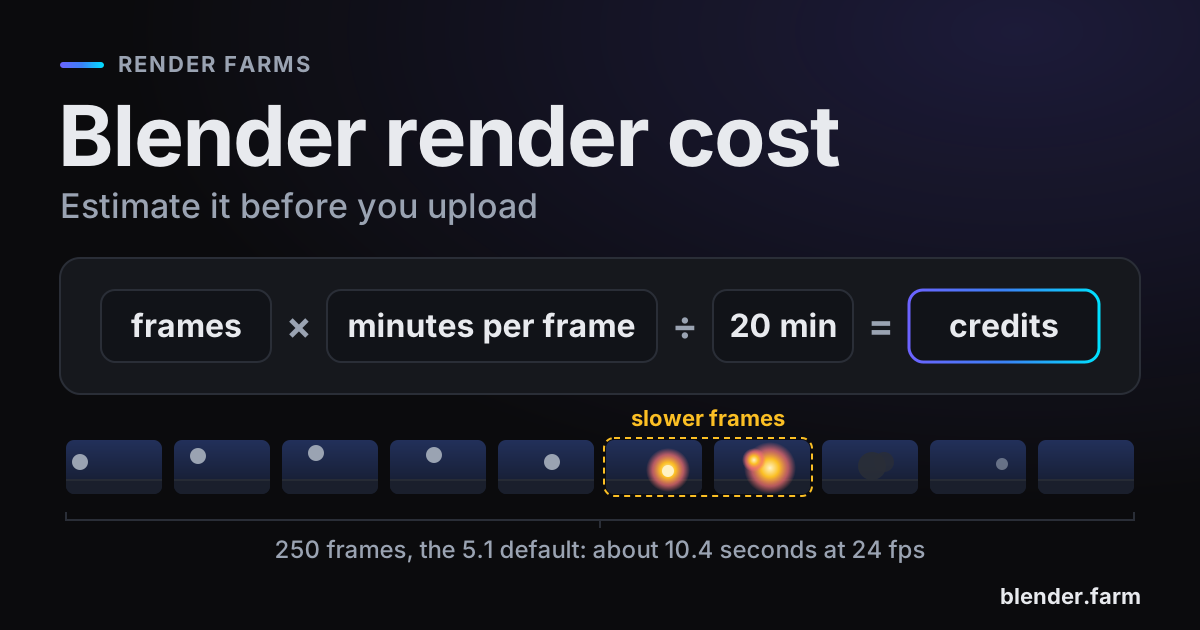
There are no points to earn first: the free credits are yours to spend from the start. Each render runs on one RTX 5090 with 32 GB of VRAM, frames stream back as they finish, and your own computer stays free. After the free credits, 1 credit is 20 minutes of render time, billed in 5-minute blocks: about $3.00 per render hour on the 10-credit pack, down to about $2.25 on the 200-credit pack. See pricing.
For how paid farms compare beyond their trials, see the best Blender render farm. If you are still deciding whether a farm is worth paying for at all, is a render farm worth it walks through the sums.
Questions
- Is SheepIt really free?
- Yes. Its FAQ says "We don't have any hidden tax like paying to get the final result, everything will be free." You pay in machine time instead: rendering other people's frames earns the points that order the queue.
- Can I use SheepIt for client work?
- SheepIt's Terms of Use do not address commercial use or client work, and make no confidentiality promise for uploaded scenes. Its FAQ says frames go to computers that people share, so whether that suits a client project depends on your contract with that client. Check it before uploading.
- Who sees my files on SheepIt?
- Per the FAQ, the service "sends each frame to a connected computer" and "relies on people to share their computers", so your project renders on machines owned by other users. The Terms' privacy section covers account names and contributors' hardware, not uploaded scenes.
- What is SheepIt's file size limit?
- 2,048 MB per project, stated in the FAQ rather than the Terms. For fluid caches that do not fit, the FAQ describes splitting one animation into several projects under the limit.
- Is SheepIt safe to run on my computer?
- The FAQ says "We provide an official Blender Foundation release, and are not modifying the Blender binary in any way", and project owners cannot run their own scripts. The Terms ask you to run the worker only on computers you own or may use, and accept no liability for damage or lost data.
Sources
- SheepIt Render Farm, Terms of use, read 29 October 2026
- SheepIt Render Farm, FAQ, read 29 October 2026
- SheepIt Render Farm, home page (live counters), read 29 October 2026
- SheepIt Render Farm, Get started, read 29 October 2026
- Drop & Render, pricing, read 29 October 2026
- Fox Renderfarm, Blender render farm, read 29 October 2026
- GarageFarm, pricing, read 29 October 2026
- GarageFarm, Blender render farm, read 29 October 2026
- Ranch Computing, prices, read 29 October 2026
- RenderStreet, RenderStreet One, read 29 October 2026
- Super Renders Farm, pricing, read 29 October 2026
- TurboRender, prices, read 29 October 2026
- TURNA, pricing, read 29 October 2026
- Blender Manual, Topbar (File > External Data), read 29 October 2026
- Blender Manual, Packed Data, read 29 October 2026