Should you buy a new GPU, or spend the money on a render farm instead? Render farm vs buying a GPU is an arithmetic question with four inputs: the card's price, your electricity, the hourly rent and how many hours you render. This post does that arithmetic in the open, with every input sourced and replaceable. It compares like with like: the same card, an NVIDIA RTX 5090, bought for your desk or rented by the hour.
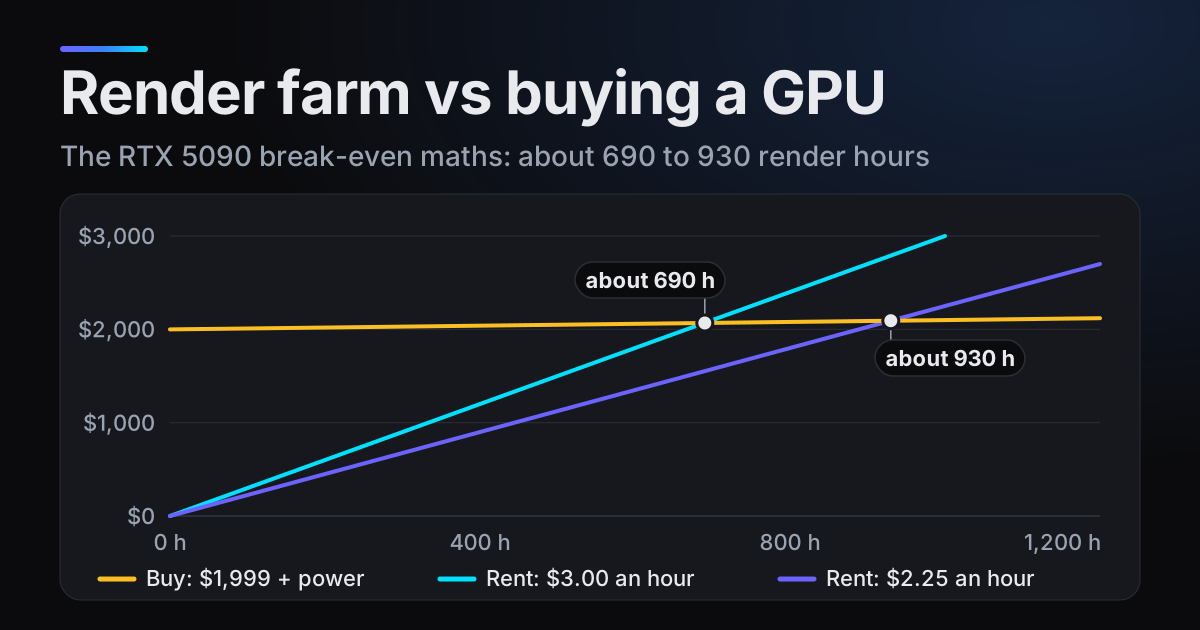
The short version: at its launch price, a bought RTX 5090 pays for itself after about 690 to 930 hours of RTX 5090 render time, depending on what renting costs you. Whether that takes a few months or many years depends on how much you render, and the second half of this post shows how to count that from frames you already have.
Render farm vs buying a GPU: the formula
Owning a card costs its price up front, plus electricity for every hour it renders. Renting the same card costs the hourly rent and nothing up front. The two totals meet at the break-even point:
break-even hours = card price / (rent per hour - electricity per hour)
Below that many render hours, renting is cheaper; above it, the card has paid for itself. Both sides have to be the same card, because an hour on a slower card is less finished work than an hour on an RTX 5090.
The inputs, with sources
| Input | Value used | Where it comes from |
|---|---|---|
| Card price | $1,999 | NVIDIA launch price for the RTX 5090 |
| Card power | 575 W | NVIDIA, total graphics power |
| System power | 1000 W | NVIDIA, required system power |
| Electricity | about 18 cents per kWh | EIA, US average residential price |
| Rent | about $3.00 to $2.25 per render hour | blender.farm credit packs, one RTX 5090 |
Card price. NVIDIA announced the GeForce RTX 5090 for desktops on 6 January 2025 at $1,999, available from 30 January. NVIDIA's US product page shows no current price, and what a shop charges can differ from the launch price, so put in what you would really pay.
Power. NVIDIA lists the RTX 5090 at 575 W total graphics power and asks for 1000 W of system power. The EIA puts the average US residential electricity price at about 18 cents per kWh. Outside the US, see the electricity table further down.
Rent. On blender.farm, an hour on one dedicated RTX 5090 costs about $3.00 on the smallest credit pack and about $2.25 on the largest (Credits and billing).
The worked numbers: about 690 to 930 hours
- 1Electricity per hour0.575 kW x about $0.18 per kWh = about $0.10 per hour for the card at full graphics power.
- 2Against $3.00 per render hour$1,999 / ($3.00 - $0.10) = $1,999 / $2.90 = about 690 hours.
- 3Against $2.25 per render hour$1,999 / ($2.25 - $0.10) = $1,999 / $2.15 = about 930 hours.
- 4Check: without electricity$1,999 / $3.00 = 666 hours and $1,999 / $2.25 = 888 hours. Power moves the answer by less than 5 percent, because $0.10 is small next to the rent.
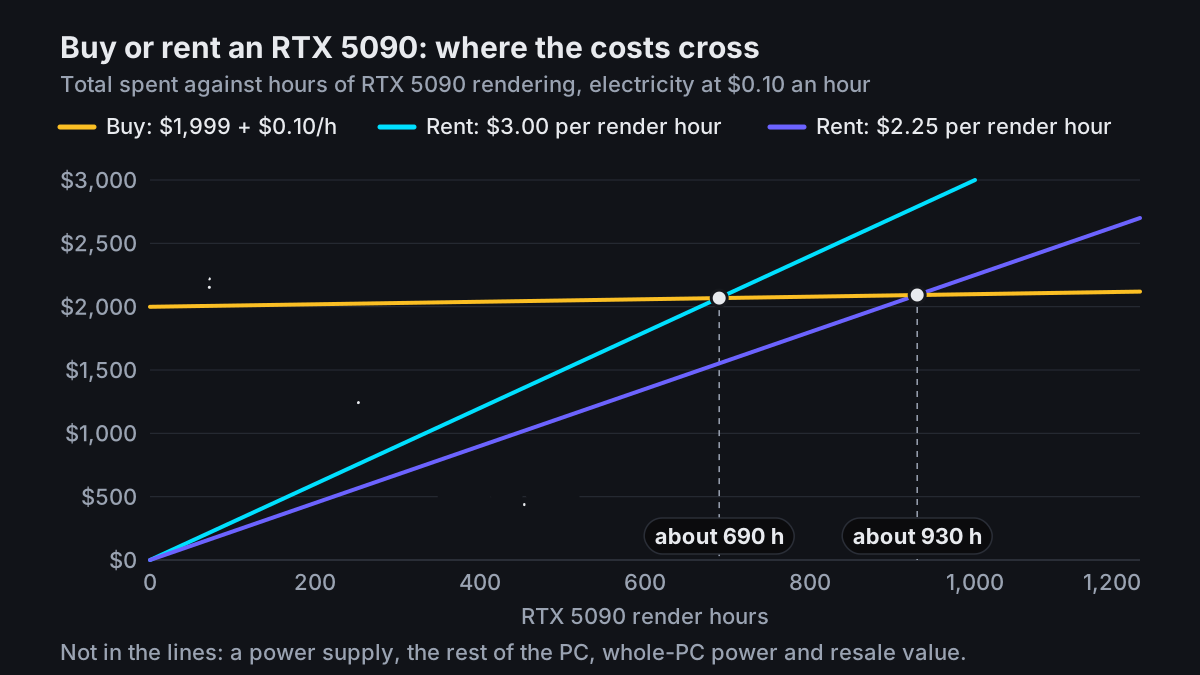
The same formula works for any rental price. A dearer rental makes buying pay off sooner, a cheaper one later:
| Renting one RTX 5090 | Per render hour | Break-even |
|---|---|---|
| blender.farm, 10-credit pack | about $3.00 | about 690 h |
| blender.farm, 50-credit pack | about $2.70 | about 770 h |
| blender.farm, 200-credit pack | about $2.25 | about 930 h |
| Super Renders, published rate | $5.17 | about 390 h |
What the number leaves out
- A power supply and the rest of the PC (break-even comes later). NVIDIA asks for 1000 W of system power and either four 8-pin PCIe cables (adapter in the box) or one 600 W PCIe Gen 5 cable. If you need a new power supply, or a new PC, add it to the card price.
- Whole-PC power (later). 575 W is the card alone. 1000 W is NVIDIA's power supply requirement, not a measured draw, but even using it as a generous upper estimate, electricity becomes about $0.18 an hour and break-even moves only to about 710 and 970 hours.
- Resale value (earlier). A card you sell later costs you less than its price. If you expected to sell it for $800, for example, put $1,199 in the formula and break-even falls to about 410 to 560 hours.
- A faster viewport (earlier, if you value it). A card on your desk speeds up previews and look-dev every day.
Electricity prices outside the US
Convert your tariff to dollars per kWh, multiply by 0.575 and use the result as electricity per hour. Even a large difference in tariff moves the break-even only a little:
| Electricity per kWh | Card per hour | Break-even at $3.00 | Break-even at $2.25 |
|---|---|---|---|
| $0.10 | $0.06 | about 680 h | about 910 h |
| $0.18 (US average) | $0.10 | about 690 h | about 930 h |
| $0.30 | $0.17 | about 710 h | about 960 h |
| $0.40 | $0.23 | about 720 h | about 990 h |
What 690 RTX 5090 hours means on the card you have
Most people asking about an RTX 5090 for Blender render on something else today, so 690 hours of it is hard to picture. Blender Open Data, the public database of Blender Benchmark results, gives a median score in samples per minute for each device. Divide the RTX 5090's median by your device's and you get roughly how many hours your hardware needs to do what the 5090 does in one.
| Device (Blender 4.5.0) | Samples per minute (median) | Hours per RTX 5090 hour | 690 RTX 5090 hours become |
|---|---|---|---|
| RTX 5090 (OptiX) | 14,966 | 1 | 690 h |
| RTX 4090 (OptiX) | 11,061 | 1.35 | about 930 h |
| Apple M4 Max, 40-core GPU (Metal) | 5,267 | 2.8 | about 1,960 h |
| RTX 4070 (OptiX) | 5,219 | 2.9 | about 1,980 h |
| RTX 4070 Laptop (OptiX) | 3,555 | 4.2 | about 2,900 h |
| Apple M4 Pro, 20-core GPU (Metal) | 2,568 | 5.8 | about 4,020 h |
| RTX 3060 (OptiX) | 2,155 | 6.9 | about 4,790 h |
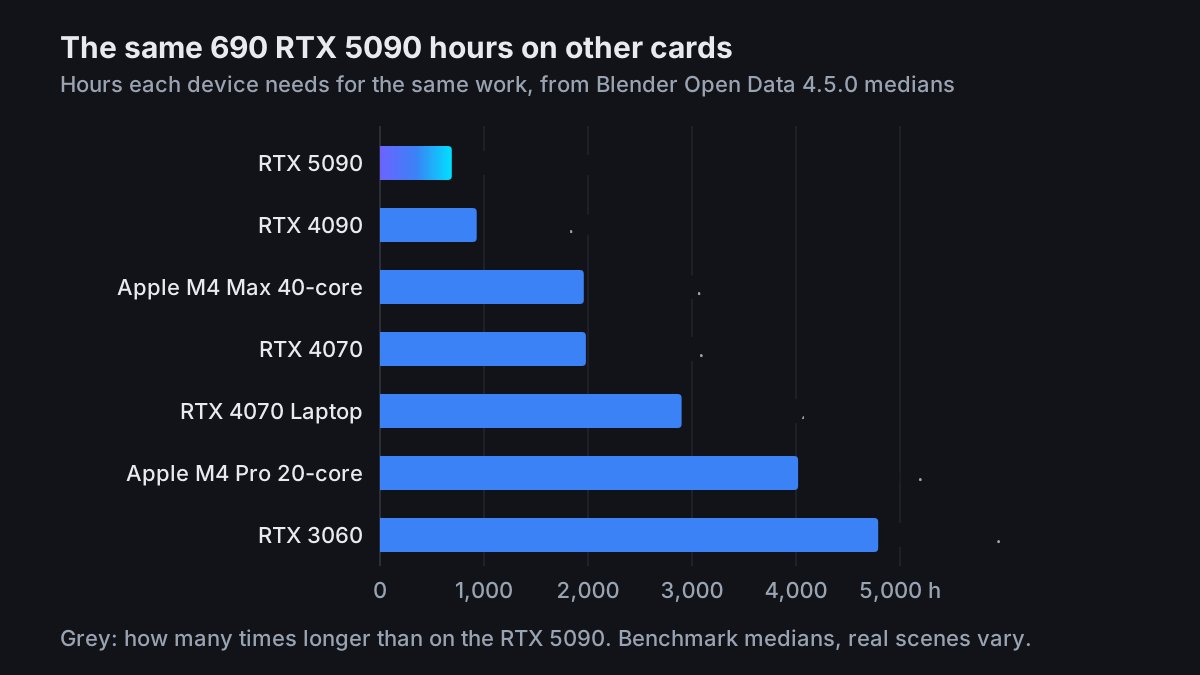
Read a row like this: if you render on an RTX 4070 today, 690 hours of RTX 5090 rendering is about the same finished work as 1,980 hours on your 4070. Treat the factors as a starting point; a one-frame test, described near the end, gives your own scene's factor.
Count your own render hours
The last input is how much you actually render. Blender already records it: the Metadata panel writes each frame's render time into the image file, and PNG, JPEG and OpenEXR all store metadata.
- 1Check that Render Time is onIn the Properties editor, open the Output tab and expand Metadata. Render Time is ticked in a default scene (we checked Blender 5.0 and 5.1). You do not need Burn into Image, which prints the text onto the picture.
- 2Collect a typical monthPut the final frames of a normal month in one folder. PNGs saved with Render Time on already carry their times.
- 3Add the times upThe script below reads the
RenderTimefield from every PNG under a folder and prints the total. It needs only Python 3 and no extra packages. - 4Convert to RTX 5090 hoursDivide your monthly total by your device's factor from the table: 2.9 for an RTX 4070, 6.9 for an RTX 3060, and so on.
- 5Read off the payback timeDivide 690 (or 930, if you would rent on the largest pack) by your monthly RTX 5090 hours. That is how many months a $1,999 card takes to pay for itself.
# Usage: python sum_render_time.py "D:/renders"
import pathlib, struct, sys

def render_seconds(png):
    data = png.read_bytes()
    i = 8
    while i < len(data):
        size = struct.unpack(">I", data[i:i + 4])[0]
        kind, body = data[i + 4:i + 8], data[i + 8:i + 8 + size]
        if kind == b"tEXt" and body.startswith(b"RenderTime\0"):
            parts = body.split(b"\0", 1)[1].decode().split(":")
            return sum(float(p) * pow(60, n) for n, p in enumerate(reversed(parts)))
        i += 12 + size
    return 0.0

frames = sorted(pathlib.Path(sys.argv[1]).rglob("*.png"))
total = sum(render_seconds(f) for f in frames)
print(f"{len(frames)} frames, {total / 3600:.2f} render hours")
An example, not a measurement. Say your RTX 4070 spends 60 hours a month rendering final frames. That is 60 / 2.9 = about 21 RTX 5090 hours a month, or roughly $63 at $3.00 an hour. Then 690 / 21 = about 33 months: the card pays for itself in a little under three years. At 20 hours a month on the same 4070, it takes about eight years.
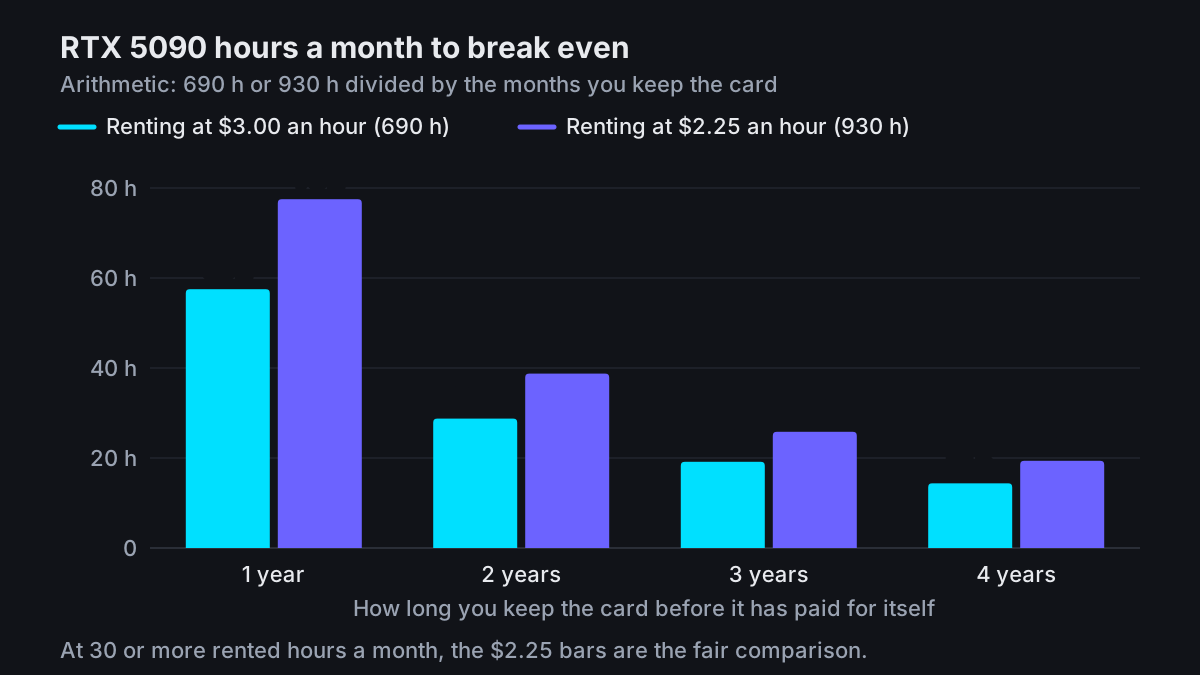
At 30 or more rented hours a month, the 200-credit pack is the sensible buy rather than many small ones, and credits do not expire. If that is you, the $2.25 bars are your comparison.
When buying the GPU wins
- You render heavily every week. If your monthly RTX 5090 hours pass break-even well within the time you expect to keep the card, the card is cheaper.
- You want a faster viewport every day. Rendered viewport, look-dev, material previews and the quick test renders you check while iterating all run on the GPU in your own machine. A render farm only renders final frames.
- You use the GPU outside Blender. Other 3D software, video work, machine learning or games all add value to the card that the formula does not count.
If that is your week, buy the card.
When renting wins
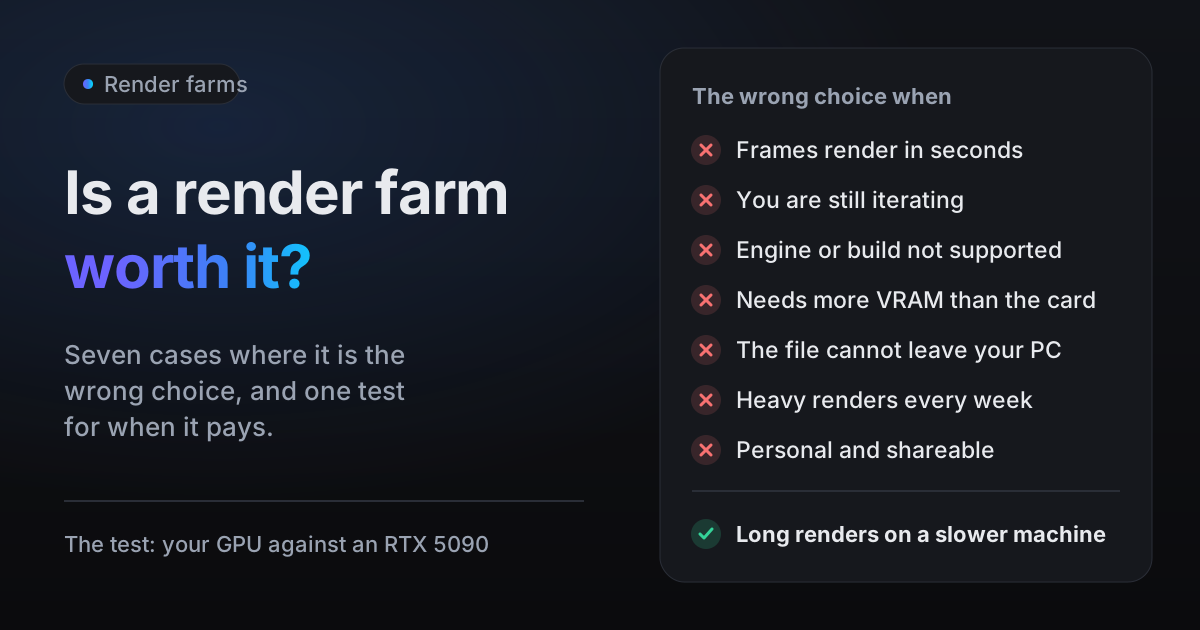
- You render big jobs now and then. A few large renders a year rarely add up to 690 RTX 5090 hours.
- You work on a laptop or a Mac. In practice an RTX 5090 means buying a desktop PC around it, and Blender's manual lists the NVIDIA backends, CUDA and OptiX, as Windows and Linux only.
- You want your own PC free while it renders. Rendering on the card that also drives your screen can make the machine sluggish; the Blender manual itself notes interactivity issues when one card does both. A rented card renders elsewhere while you keep working.
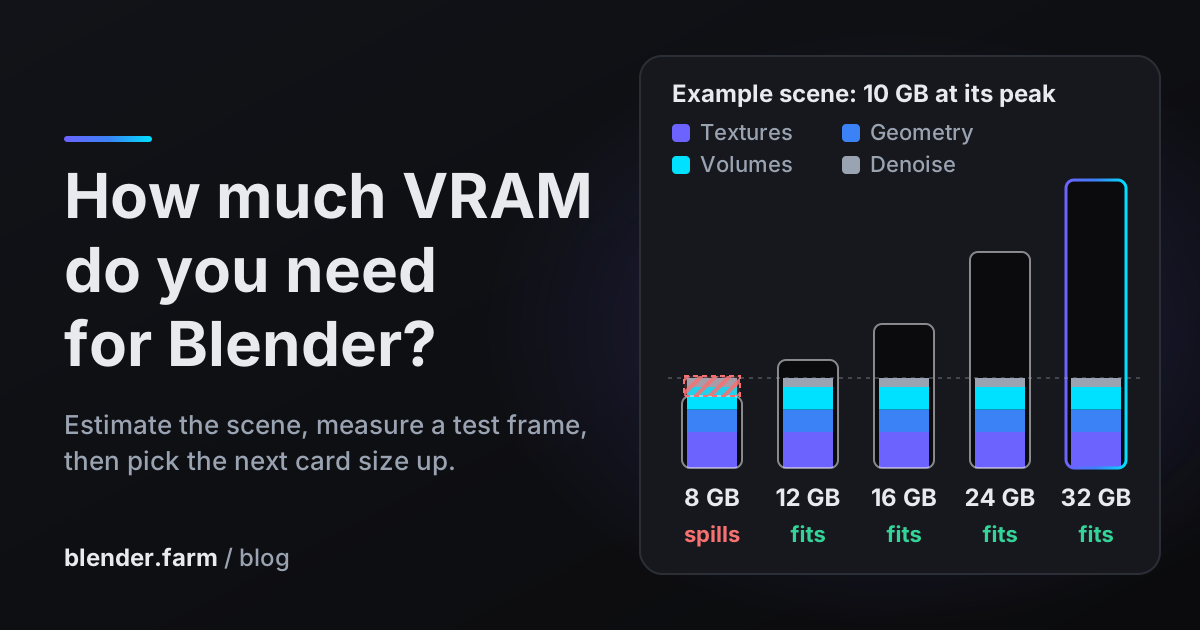
- One project needs 32 GB. If a single scene runs out of memory on your card, renting 32 GB for that project usually costs far less than buying it. See how much VRAM Blender needs.
- You would rather not spend $1,999 up front. Credits come in packs from $9.99, bought when you need them.
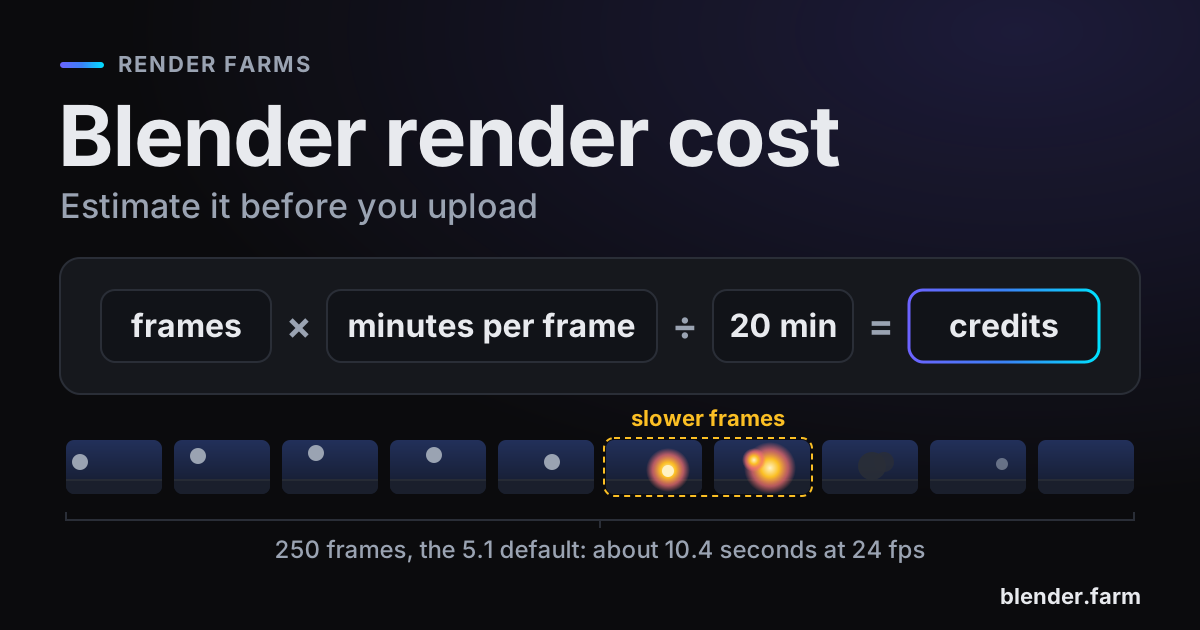
Whether a farm is worth it for a particular deadline or client job is a separate question: see is a render farm worth it, and how much a Blender render costs to price one job.
Rent the same card before you buy one
blender.farm renders every job on one dedicated RTX 5090 with 32 GB, the card this post is about. It costs about $3.00 per render hour on the 10-credit pack, down to about $2.25 on the 200-credit pack, billed in 5-minute blocks. There is no subscription and no minimum spend, and credits do not expire. Only the time Blender spends rendering is billed. Your own PC stays free, and frames stream back live while the render runs.
For reference, Super Renders publishes $5.17 per hour of rendering for one RTX 5090 with 32 GB, the same card, billed per second, and gives new accounts a $25 starter credit; see our comparison with Super Renders. iRender rents a whole remote workstation with one RTX 5090 at $10.80 per node-hour, or $9.72 when you pay for 3 hours or more. That is a different product, a full desktop you drive yourself, billed (per iRender's own blog) from when the Connect button appears until you press Shutdown, so it is not a price per render hour.
The most useful number before spending $1,999 is your own. New accounts get 10 free credits, 3h 20m of render time on the RTX 5090. Send one representative frame from the free Blender add-on, render the same frame at home, and compare: the live view shows each frame with the time it took. Dividing the two gives your scene's real factor instead of a benchmark median.
Questions
- Is an RTX 5090 worth it for Blender?
- Yes, if you render enough to pass break-even while you own it: about 690 to 930 RTX 5090 render hours against renting the same card at $3.00 to $2.25 an hour. It is also worth it for a faster viewport every day, which renting cannot give you.
- How many render hours before buying a GPU pays off?
- Divide the card price by the hourly rent minus your electricity per hour. For an RTX 5090 at $1,999, US electricity and rent of $3.00 to $2.25, that is about 690 to 930 hours, before a power supply, the rest of the PC and resale value.
- Should I buy a GPU for rendering or use a render farm?
- Count your monthly render hours, convert them to RTX 5090 hours with the Blender Open Data factor for your card, and divide 690 or 930 by the result. If that is shorter than the time you will keep the card, buy it; if it is longer, rent.
- Does a render farm make my viewport faster?
- No. A render farm renders final frames from your saved .blend file; the viewport, look-dev and previews still run on the GPU in your own machine.
- How do I do this maths with electricity prices outside the US?
- Convert your price per kWh to dollars, multiply it by 0.575 for the card alone, and subtract that from the hourly rent. Between 10 and 40 cents per kWh, the RTX 5090 break-even at $3.00 only moves from about 680 to 720 hours.
Sources
- NVIDIA, GeForce RTX 50 Series announcement, 6 January 2025 (launch prices), read 29 October 2026
- NVIDIA, GeForce RTX 5090 specifications (power and memory), read 29 October 2026
- U.S. Energy Information Administration, Electric Power Monthly, Table 5.6.A (average residential price), read 29 October 2026
- Blender Open Data, Blender 4.5.0 medians, NVIDIA cards (OptiX), read 29 October 2026
- Blender Open Data, Blender 4.5.0 medians, Apple chips (Metal), read 29 October 2026
- Blender Manual, Metadata, read 29 October 2026
- Blender Manual, Supported Image Formats (metadata support), read 29 October 2026
- Blender Manual, GPU Rendering (CUDA, OptiX and Metal support), read 29 October 2026
- Super Renders Farm, pricing, read 29 October 2026
- iRender, price list, read 29 October 2026
- iRender blog, Hidden Costs of Cloud Rendering (when billing starts and stops), read 29 October 2026